Software Factory: What It Is and Where to Start
Whether you’re automating one task or the whole cycle, the same question comes up at every stage of a software factory: what does an engineer know about the system that an agent would need to know to do the work well?

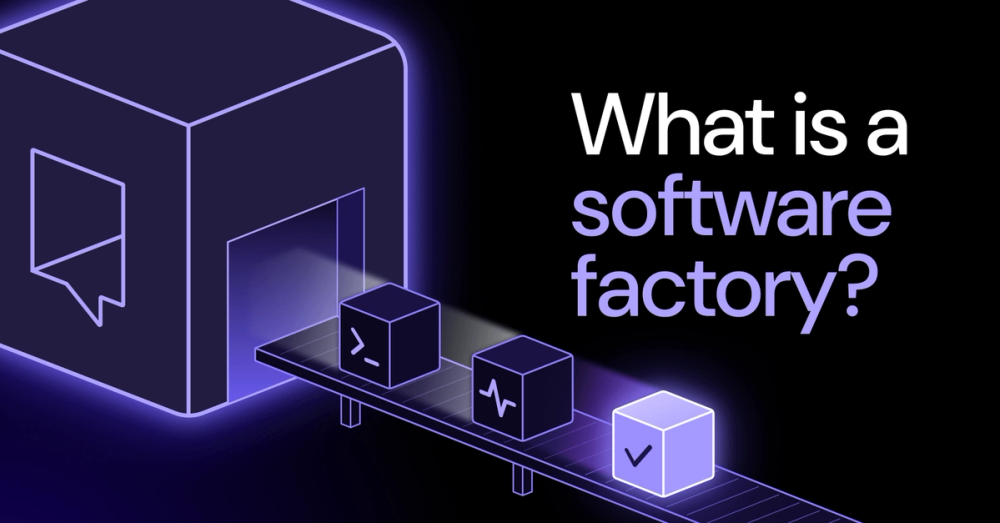
There’s a lot of noise about “software factories,” but if you’ve ever shipped software, you already know the process behind the name. You decide what to build, write and test the code, get it into production, and maintain it once it’s there.
We’ve called that the software development life cycle (SDLC) for decades. What’s new is how much of that familiar work engineering teams can now hand off to agents.
In practice, very few teams have automated that entire cycle. What’s more common is automating individual pieces, like using an agent to pick up a GitHub issue and open a pull request, automatically merging small changes when CI passes, or having an agent spot a production error and ship a fix.
Whether you’re automating one of those tasks or the whole cycle, the same question comes up at every stage. What does an engineer know about the system that an agent would need to know to do the work well? We’ll use that question to walk through the stages of a software factory and explain why ambient context matters at each one. It’s also the question that led us to build Unblocked’s context layer.
Why a Software Factory?#
The aspiration of a Software Factory changes what a team can afford to work on.
Every team has a backlog with bugs that annoy customers and recurring support issues that engineers know how to fix but don’t have the cycles to work on.
Writing the code is only part of the cost. Someone has to see each change through review, testing, and release, and that time factors into what the team decides to take on.
Take a bug that support hears about every week. It’s a small fix, but getting it into the next release means pulling an engineer off something else.
If an agent can pick up the ticket, write the fix, and get it ready for review, the engineer only needs to review the change. That can be enough to get a long-standing bug fixed and give support one fewer issue to field every week.
What is a software factory?#
The software factory is itself an old idea. It dates to Bob Bemer's 1968 paper, "The economics of program production," and the term was first adopted by Hitachi in 1969 with its Hitachi Software Works. The idea was to make software development more repeatable by giving engineers a common set of tools and practices.
Today, a software factory connects the stages of the software development life cycle so agents and tools can take a change from an initial request through rollout, with engineers involved where their judgment is needed. The stages will look familiar to most teams. What varies is how each team decides what to build, what’s safe to ship, and how to tell whether a change worked.
The stages of a software factory#
A software factory typically follows the same life cycle your team uses today. The specifics of each stage are specific to the organization, but the same question applies throughout. “What would an engineer need to know to accomplish this task, and how will the agent get that context”?
Plan#
Planning starts with two questions an engineer would ask before writing any code. “What needs to change, and how will we know it worked?”
Work can start with a request from a person (a customer reported bug) or a signal from the underlying system itself (a monitoring system might flag a sudden rise in application errors, prompting an agent to investigate).
In either case, the agent needs to understand how the system is supposed to behave and what’s happening today. With that context, it can propose a change and define how the team will verify it.
Build#
The plan describes what needs to change. During implementation, the agent has to decide where that change belongs, what it can reuse, and what else depends on the code it’s about to modify.
An engineer familiar with the system brings all those decisions into the task at hand.
Likewise, an agent needs a way to connect the code it’s changing with the decisions that shaped it.
When that context is available as the agent works, it can choose an approach that fits the system without an engineer having to reconstruct the history for it. The agent then implements the change, updates the tests, and runs the same local checks an engineer would.
Verify#
Verification returns to the question from planning. How will we know the change worked? The agent checks the implementation against the acceptance criteria and verifies that the system still behaves as expected wherever the change could have an effect.
Knowing what to check takes context.
A past incident may have exposed a failure worth testing for, or a pull request discussion may explain why a particular behavior needs to be preserved.
When the agent can draw on that history, it can test for conditions that never made it into the ticket and tell the reviewer what it verified and what remains uncertain.
Review & Assess risk#
Once a pull request is open, code review asks whether the implementation is sound. An engineer reviewing a change brings some history to that judgment. A piece of code that looks unnecessary may preserve behavior the team deliberately agreed to support. An agent that can connect the diff to that earlier decision can flag when the change breaks the agreement and explain why it matters.
Risk assessment asks a different question. If this change goes wrong, what impact will be felt?
A small, correct edit to the code for your billing system can pass review and still affect every customer.
To judge that risk, the agent needs to know which products and workflows depend on the behavior being changed.
That gives the team a reason to involve the billing owner or roll the change out gradually, even when the code itself is ready to merge.
Observe#
As the change rolls out, the factory returns to the question from planning. Did the change have the intended effect in production, and did it cause problems elsewhere? To answer that, the agent needs to connect what it sees in production with what changed, which users have received it, and how the system normally behaves.
That context helps the agent explain what the evidence supports. If the rollout is progressing as expected, the team can expand it. If something looks wrong, the agent can flag what changed and who may be affected so the team can decide whether to pause or roll back. What the team learns in production then informs the next round of planning.
One agent per step#
In a modern software factory, an agent is responsible for each of these steps. That agent wakes up based on a signal, executes its work, and then passes it on to the next step. That's why it's critical that we manage that agent's context window as effectively as possible, so it can do its best work with the right information.
Codified and ambient context#
Across every stage of a software factory, an agent needs to know how the team expects it to work and what matters about the particular change in front of it. Some of that knowledge is useful often enough that engineers write it down as guidance for future tasks. The rest has to be assembled when the agent knows what it’s working on. We call these two forms of context codified and ambient.
Codified context#
“Codified context” is guidance the team deliberately writes, versions, and maintains for repeated use. An AGENTS.md file can spell out a codebase convention. A skill can capture a procedure engineers want agents to follow consistently. The team decides in advance which guidance should apply whenever an agent takes on that kind of work.
Ambient context#
“Ambient context” is information from your team’s day-to-day work that helps an agent make a decision about a specific task.
An engineer might explain a design choice in a pull request, or a customer might describe how they use a feature in a support thread.
Those details can matter to a future change even if nobody thinks to turn them into instructions.
Say an agent is reviewing a pull request that removes a field from an API response. The field looks unused in the codebase, but a customer mentioned in a support thread that their integration still reads it. With that context, the agent can flag that removing the field could break the customer’s integration and point the author to the conversation that explains why.
That’s where Unblocked’s context layer fits. It gives agents access to what your team learns through its day-to-day work, alongside the guidance you’ve written down.
When agents have both, they work faster, spend fewer tokens searching, and produce better output.
Where to start#
To get started building your own software factory, the best approach is to choose one step and automate as much as you can.
Currently, the step companies most often start with is code review.
Planning is another natural starting point. When someone opens a ticket, an agent connected to your issue tracker can gather the relevant context and draft an implementation plan. A second agent can then follow that plan to write the code.
Wherever you choose to start first, it's critical that you consider codified and ambient context as key ingredients in every agent's context window.
Unblocked connects your agents to the decisions, discussions, incidents, and conversations behind your code, so each step of the factory works with the full picture.
Next in our Software Factory series we'll go into detail on each of the stages, starting with Plan, because a better plan makes every step after it better.