Permission-aware Answers: Keep Sensitive Information Secure With Data Shield
Unblocked's Data Shield gives you granular access controls to protect your team’s sensitive data while getting answers from Unblocked.

It’s impossible to have a conversation about AI tooling without addressing the security risks they introduce. Many AI platforms – whether 3rd party or internally-built – train models on all available data, regardless of access permissions. This puts your sensitive data at risk of leaks or misuse when you connect it to these systems.
Unblocked addresses these challenges with ease. Your data stays private, isolated, and is never used to train shared models. And now with Data Shield, you can ensure your team only sees answers from data they’re explicitly authorized to access.
How does Unblocked’s Data Shield work?#
Data Shield manages Unblocked’s information access for all the data sources you’ve connected.
You’ve already set access permissions in each of your team’s tools (e.g., GitHub, Jira, Confluence, Slack) which stipulate which team members are allowed to view various files, discussions, code, and more.
When a team member connects their sign-in identity in various platforms to your Unblocked account, Unblocked maps their identities and existing permission levels across the connected data sources.
With Data Shield, Unblocked automatically respects these existing access controls. It applies multiple layers of filtering to ensure that your team only receives answers containing data they are authorized to view. This means that if someone only has access to one Confluence space, Unblocked’s answers for this user will exclude data from any of the other connected spaces they don’t have permission to view.
Secure your data with one switch.#
To get started with Data Shield, all you need to do is toggle the setting to ‘On’ within the ‘Security’ tab of the ‘Settings’ page on the Unblocked web app.
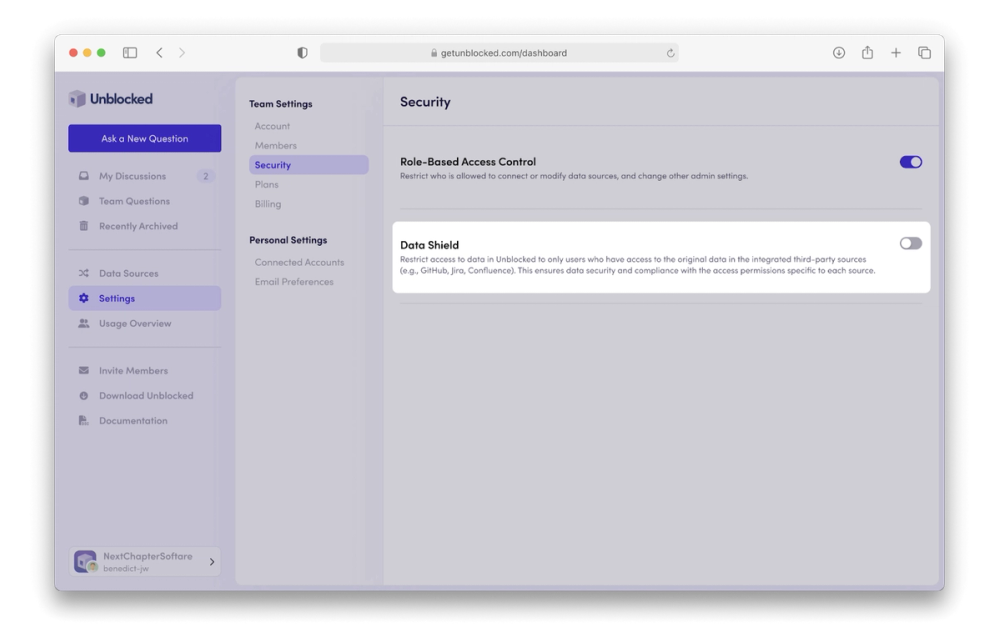
Note: Once Data Shield is enabled, ensure your team members connect their accounts from Jira, GitHub, Slack, and other tools you integrate within Unblocked.
Connecting individual accounts is essential for high-quality answers, especially with Data Shield turned on, since Unblocked filters out data sources for users who haven’t linked their accounts to prevent unauthorized access. The more accounts a team member connects to Unblocked, the more accurate and relevant their answers will be.
Your data, your control.#
Data Shield empowers your workspace admins with full control over information access in Unblocked, keeping sensitive data secure while delivering the right answers to the right people.
To learn more about Data Shield and other enterprise features like Single Sign-on and Role Based Access Control, get in touch with us.