Introducing Audit Logs
Admins now have a clear, searchable record of the key actions happening across Unblocked so you can stay in control, spot issues early, and keep your workflows running smoothly.

When Unblocked is plugged into your CI, your data sources, and your workflows, you want to know what’s happening behind the scenes. Audit logs give you that clarity.
Admins now have a clear, searchable record of the key actions happening across Unblocked so you can stay in control, spot issues early, and keep your workflows running smoothly.
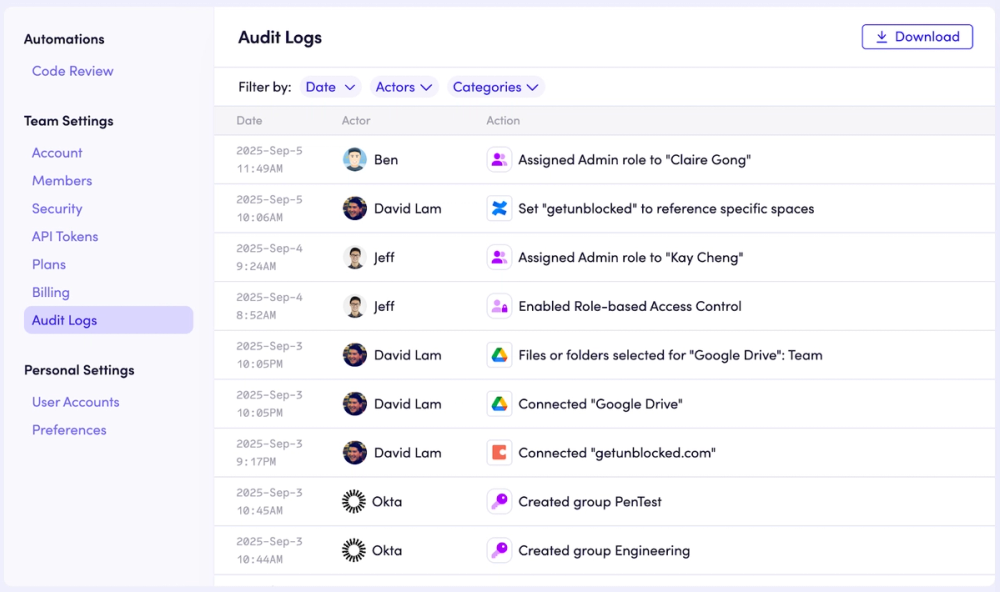
Here’s what gets captured:
- Team-level changes like renames or deletions
- Data source connections, disconnections, and modifications
- Member adds, removals, and role changes
- Modifications to security features (including Data Shield and SSO)
- License assignments, trial extensions, and billing updates
- CI provider configuration changes and API token updates
Filter logs by date, actor, or action category to quickly find exactly what you need.
Audit logs help your team:
- Stay informed about important changes as your setup evolves
- Pinpoint issues quickly by reviewing what changed right before a failure
- Catch risks early like unexpected role changes or new API tokens
- Track billing events with a complete history of license and payment updates
Audit logs are available now on the Enterprise plan. You’ll find them under Team Settings in the Web Dashboard (accessible to admins with Role-Based Access Control enabled).